Blog
A Guide on Checking A Property Agent’s Record in CEA Singapore (2026 Update)
Published 19 January 2026
TL;DR / Summary:
– The CEA Public Register, managed by the Council for Estate Agencies (CEA), is the official database for all licensed real estate professionals in Singapore.
– The register displays completed HDB and private property transactions from the last 36 months.
– Users can check if an agent or agency is currently suspended or revoked.
– As of June 2026, the register also shows enforcement history and industry-wide statistics for both agents and agencies.
Have you ever visited a cafe that, as your friend swore, makes the best cappuccino in Singapore, only to be severely underwhelmed?
Imagine if that was a property agent, and instead of wasting $12 (plus GST) on mediocre coffee and stale pastries, you squandered thousands of dollars for a “specialist” who’s charging a higher-than-average commission for subpar service, or worse, finding out that he’s not even licensed to help you sell your home.
And you’re wondering, how do you even find the good agents out there? The ones trusted and proudly recommended by not just one but thousands of people who have worked with them previously.
All you have to do is know where to look.
Table of Contents:
- Where Can You Find a Good Property Agent?
- What Do You Look For in CEA’s Public Register?
- 1: Check If Your Property Agent/Agency Is Registered/Licensed
- 2: Verify If Your Property Agent’s Registration Number Is Accurate
- 3: Ensure That Your Property Agent’s Name, Contact Number, and Registration Number Match the Records on CEA’s Public Register
- 4: Check Property Agent Transaction Record in the Last 36 Months
- 5: Check If Your Property Agent Is Currently Suspended or Revoked
- 6: Check Industry-Wide Enforcement Stats and Past Enforcement Actions
- Sell or Buy a Property With Ohmyhome’s Super Agents
- Frequently Asked Questions
Where Can You Find a Good Property Agent?
You can start looking at the Public Register, created by the Council for Estate Agencies (CEA), where you can find all the licensed real estate agencies in Singapore and the registered property agents you can engage to sell your home.
Before we move forward, please note these terminologies:
- A ‘salesperson’ is a property agent; an individual
- An ‘estate agent’ is a property agency: a business or a company
What Do You Look For in CEA’s Public Register?
1
Check Registration
Ensure the agent/agency is legally licensed by CEA to conduct estate work
2
Verify ID Number
Registration numbers are unique and must be on all sales materials
3
Match Records
Ensure name, mobile number, and registration ID match exactly to avoid impersonation scams
4
Review Transactions
Check the last 24 months of activity to gauge success rates in specific towns or property types
5
Check Suspension Status
Check if an agent or agency is currently suspended or has had their licence revoked
6
Check Enforcement History
Review industry-wide enforcement stats and an agency’s enforcement track record
1: Check If Your Property Agent/Agency Is Registered/Licensed
This criterion is non-negotiable, as CEA legally requires all property agents and agencies in Singapore to secure a valid licence or registration before conducting any estate agency work.
According to the Estate Agents Act, property agencies operating without a licence can be fined up to $75,000 and imprisoned for up to three years, while property agents who are not registered can be fined up to $25,000 or imprisoned for up to a year. Though you won’t be directly slapped with the fines, you wouldn’t want to be caught in the crosshairs either. After all, you still want to sell your home.
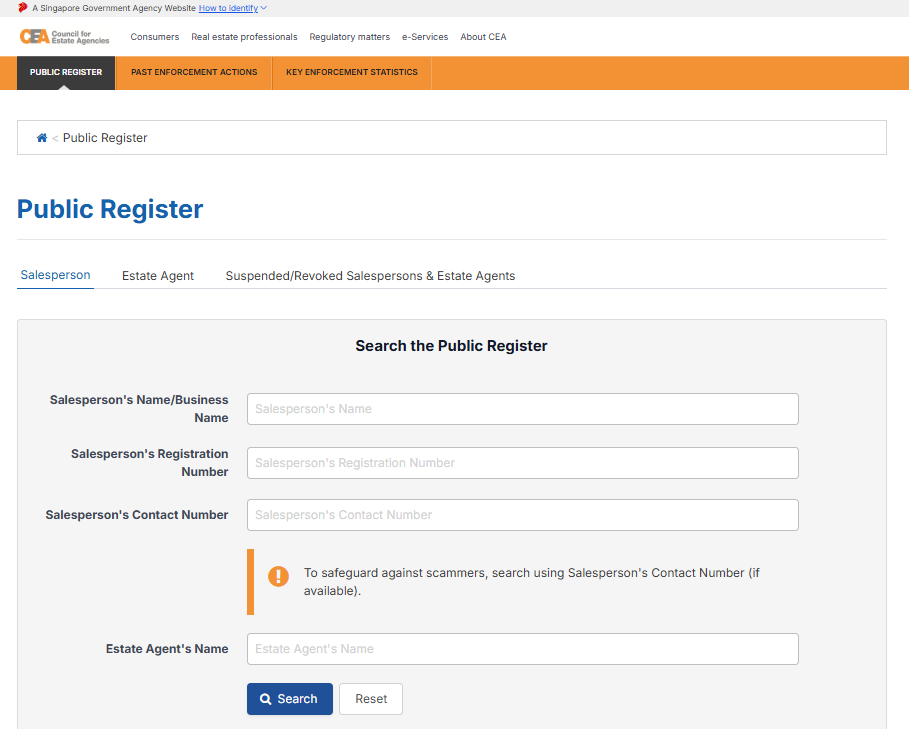
Search Via Property Agent’s Name or Number
Step 1: Go to CEA’s Public Register
Step 2: Click the ‘Salesperson’ tab
Step 3: Key in any of these particulars:
- Salesperson’s Name
- Salesperson’s Registration Number
- Salesperson’s Contact Number
- Estate Agent’s Name
Step 4: Hit ‘Search’
At this stage, you should see this page:
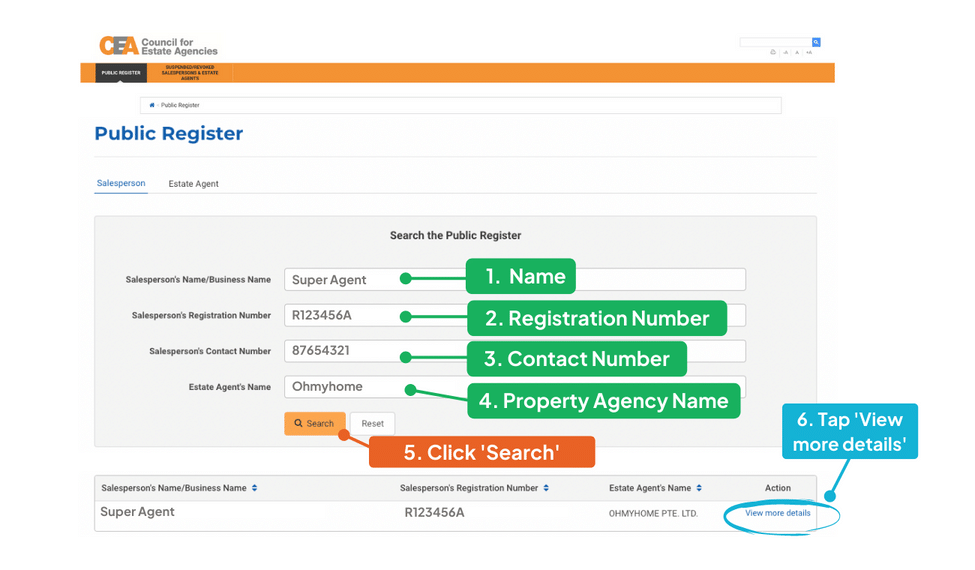
Step 5: Tap ‘View more details’
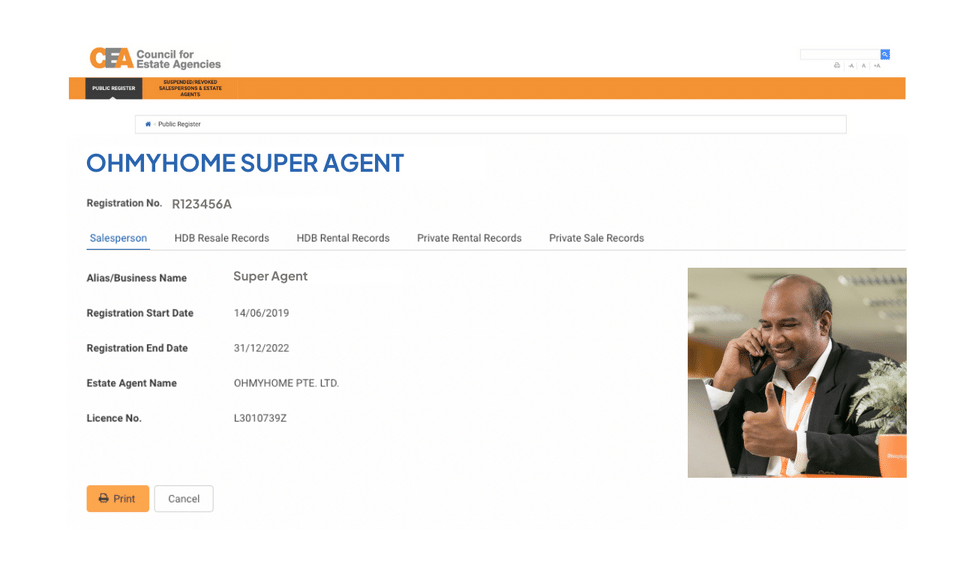
After which, you should be able to see this page:
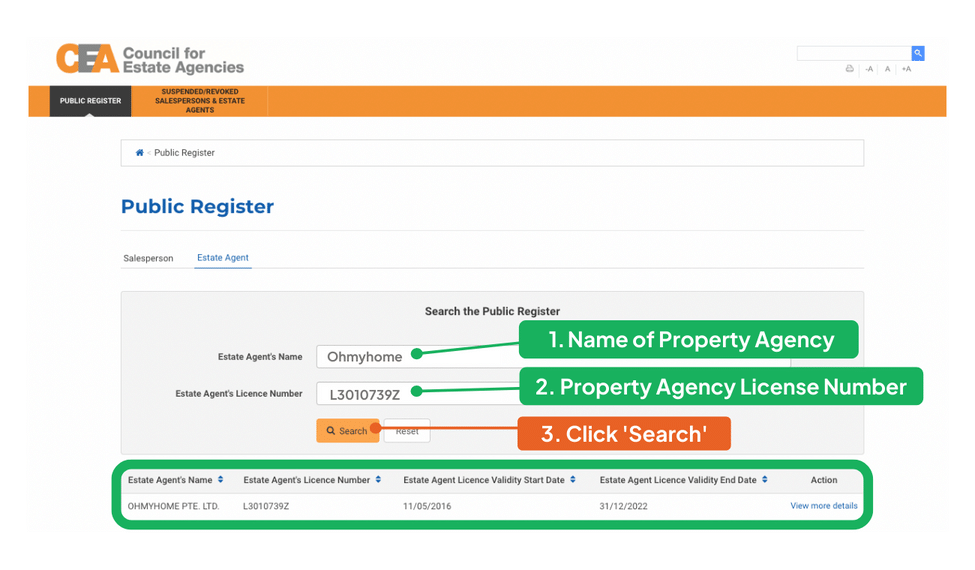
Search Via the Property Agency’s Name or Number
Step 1: Go to CEA’s Public Register
Step 2: Click the ‘Estate Agent’ tab
Step 3: Key in any of these particulars:
- Estate Agent’s Name
- Estate Agent’s Licence Number
The results should look something like this:
The licensing and registration information on CEA’s Public Register is updated daily, so you can check it anytime.
2: Verify If Your Property Agent’s Registration Number Is Accurate
Your property agent’s registration number should be included in any of their sales materials or presentations (e.g., flyers, bus ads, online ads in the form of posts or videos, presentation slides), which is also a requirement by the CEA.
The registration number is unique and made up of a letter, six numbers, and another letter, e.g., R123456A.
If it doesn’t resemble the above example, move on and find another agent to help you sell your home.
3: Ensure That Your Property Agent’s Name, Contact Number, and Registration Number Match the Records on CEA’s Public Register
Make sure that the name, mobile number, and registration number of the agent you’re talking to match whatever is on CEA’s Public Register so you can protect yourself from scam artists.
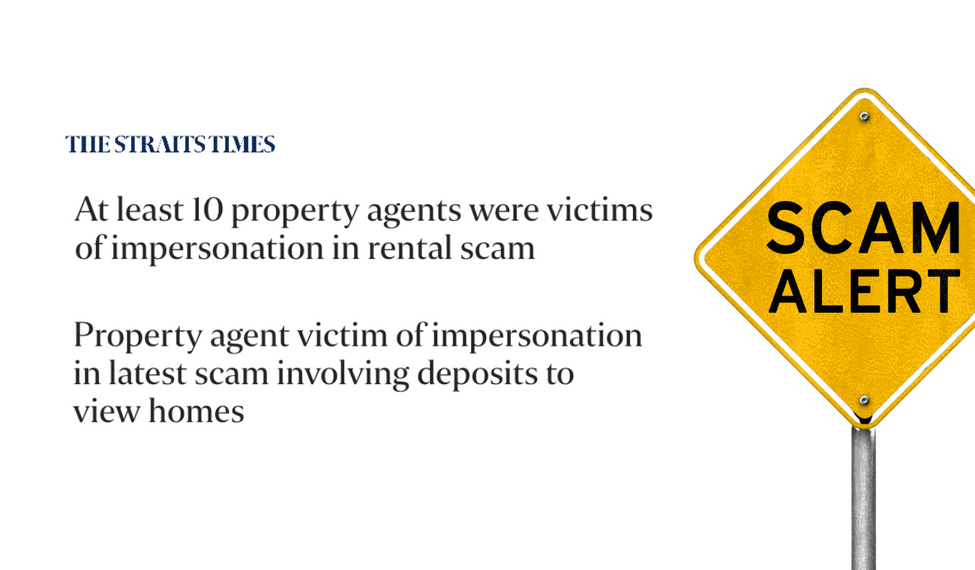
Let’s say you’re talking to a Mr Joe King, and you follow the steps above to check this property agent’s transaction record and registration with CEA. Though his name does pop up on the register, the mobile number he’s using to send you listings on WhatsApp is not what’s recorded on CEA. In this case, the person you’re talking to may be impersonating an actual, registered property agent and harbouring an ulterior motive.
You should stop contacting this agent immediately, report him to the authorities, and search for another property agent, following the steps above again to verify their authenticity.
4: Check Property Agent Transaction Record in the Last 36 Months
CEA’s Public Register allows you to review your property agent’s most recent transactions, particularly in the last three years. Let’s say you’ve found your agent in the Public Register and clicked ‘View more details’, you should be able to see this page:
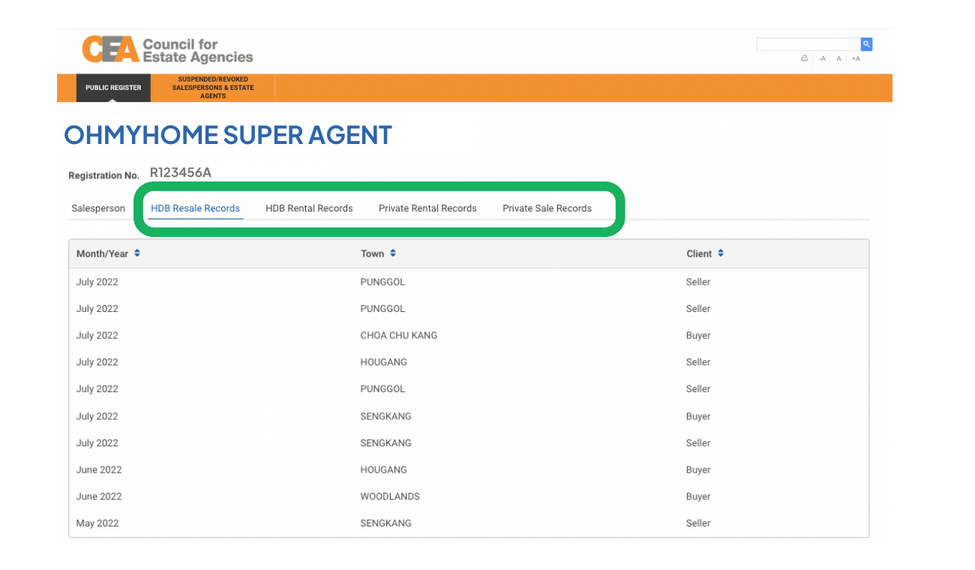
From this page, you can look at your property agent’s transaction history with a seller, buyer, tenant, or landlord:
- HDB resale records
- HDB rental records
- Private rental records
- Private resale records
These records are updated every 15th of the month and only show transactions completed within the last year from the date of access. Transaction records older than 36 months can be found on data.gov.sg, though the available records there only go back as early as 1 January 2017.
Some other things to note about these transaction records:
- HDB resale transactions are provided by HDB.
- Rental transactions for HDB or private properties are provided by the agencies.
- If your property agent worked with a team of other agents to represent the same transacting party for a specific transaction, the property agency will determine which agent the transaction will be recorded under for publication in the Public Register.
With access to a property agent’s recent transactions in Singapore, you can get an idea of how well they can serve you based on their success rate of transacting either a resale HDB flat or private property in your town, regardless of whether you’re a seller, buyer, or tenant.
5: Check If Your Property Agent Is Currently Suspended or Revoked
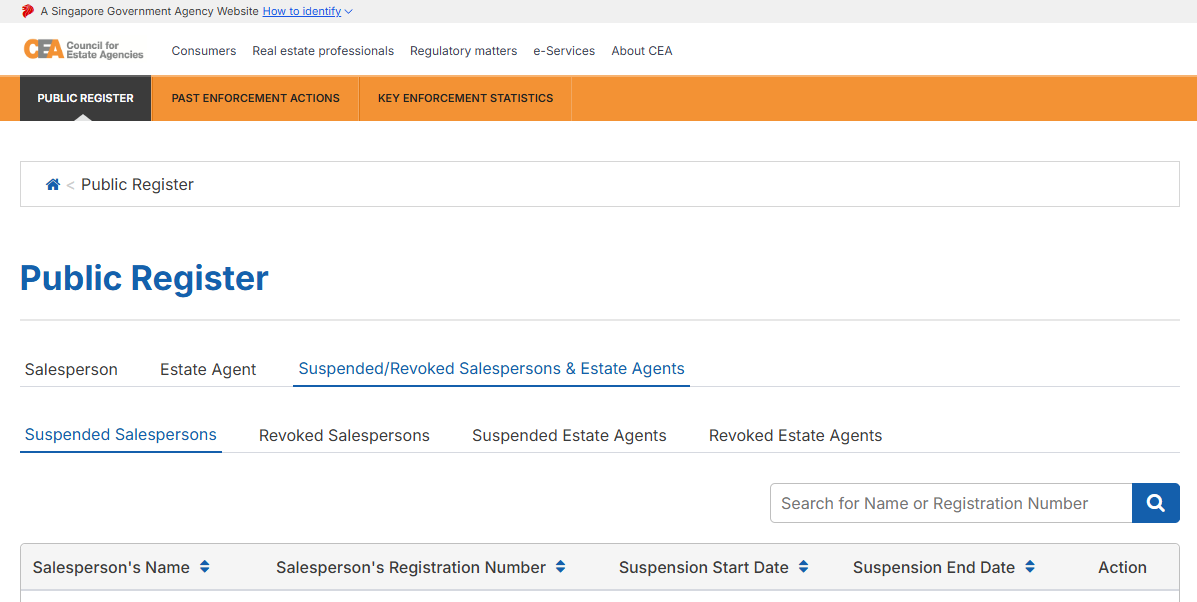
If a property agent has been suspended or had their licence revoked, you’ll find them listed under the ‘Suspended/Revoked Salespersons & Estate Agents’ tab.
Step 1: Go to CEA’s Public Register
Step 2: Click the ‘Suspended/Revoked Salespersons & Estate Agents’ tab
Step 3: Choose the relevant list — “Suspended Salespersons”, “Revoked Salespersons”, “Suspended Estate Agents”, or “Revoked Estate Agents”
Step 4: Search by name or registration number, or scroll through the list
Step 5: Click ‘Show Details’ on any entry to see the agent’s name, registration number, and suspension period, along with the specific reason for the suspension, including which regulation was breached, what they failed to do, and when the suspension took effect.
6: Check Industry-Wide Enforcement Stats and Past Enforcement Actions
As part of CEA’s enhancement to the Public Register on 10 June 2026, two new tabs now sit alongside Public Register in the main menu: Past Enforcement Actions and Key Enforcement Statistics. These give you a fuller picture of an agent’s or agency’s track record over time, beyond just whether they’re currently suspended.
Past Enforcement Actions
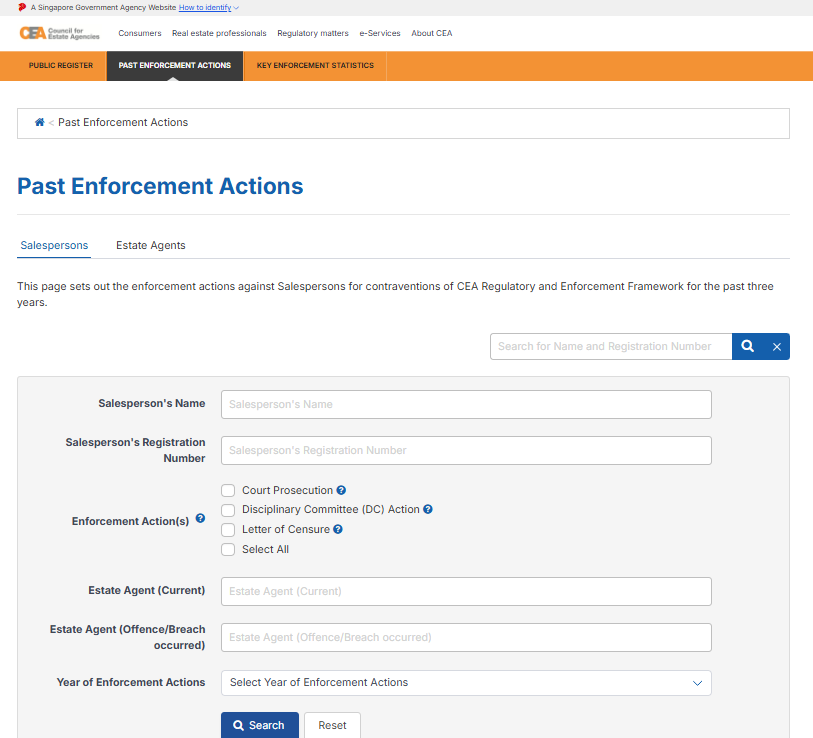
This page lists every enforcement action taken against agents and agencies over a rolling 3-year window, covering Letters of Censure, Disciplinary Committee (DC) Action, and Court Prosecution, including penalties already fully served.
Step 1: Click ‘Past Enforcement Actions’ in the main menu
Step 2: Search by name or registration number, or browse the full list
Step 3: Click ‘Show Details’ on any entry for the full case details
Note: if an agent has since moved agencies, the listing shows both the agency they were with at the time of the breach and their current agency, so you can see the full picture either way.
Key Enforcement Statistics
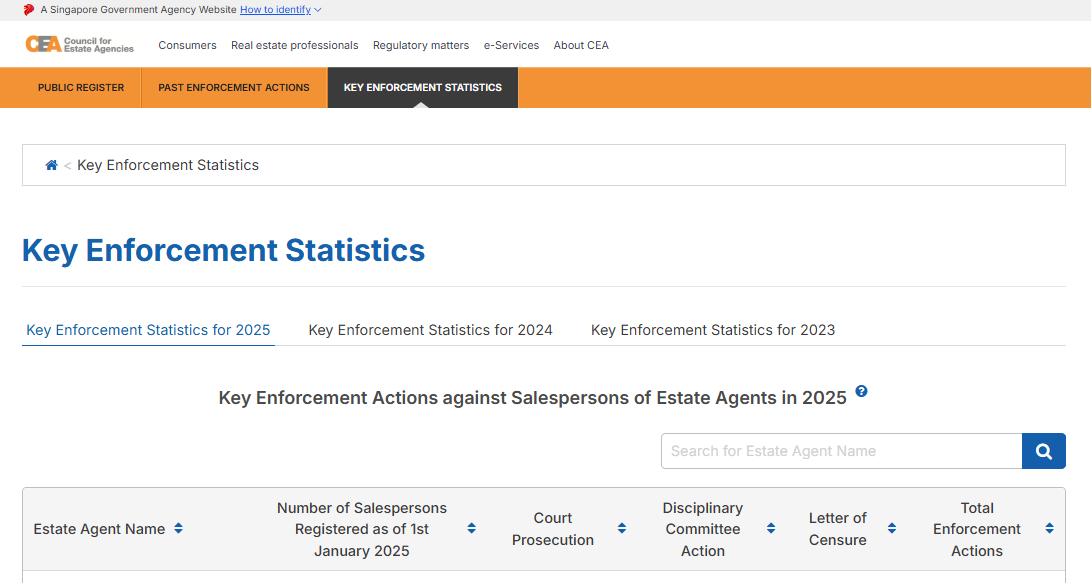
This page shows enforcement totals by agency, alongside how many agents each agency has registered, so you can compare agencies proportionally instead of just by raw numbers.
Step 1: Click ‘Key Enforcement Statistics’ in the main menu
Step 2: Compare agencies by enforcement count relative to their total registered agents
By checking registration, registration number accuracy, name and contact match, transaction history, suspension status, and now enforcement history and industry-wide comparisons, you’ll get a clearer picture of the property agent or agency before you decide to work with them.
You can go ahead and look for Ohmyhome on CEA’s Public Register, and feel free to reach out to us if you have any further questions.
The CEA’s Enhanced Public Register Gives You More Transparency on Property Agents and Agencies
Sell or Buy a Property With Ohmyhome’s Super Agents

Whether you’re selling your HDB flat or private property, or looking to buy your next home, you can rely on Ohmyhome’s CEA-certified Super Agents to guide you every step of the way.
Drop us a message on WhatsApp, and we’ll be in touch with you right away.
Not ready to speak with an agent? Stay updated on your home valuation, recent transactions, and cash flow with Homer AI!
Get an instant valuation for your home Access property insights and AI tools to maximise your property's potential and sell it fast Floor - Unit Property Type Home Type - Postal Code Get FREE valuation
Homer AI is our home ownership management and e-Valuation tool that provides an accurate estimation of your home valuation. It’s updated every month, so you can track if it increased, stayed the same, or decreased.
Homer AI can also help you:
- Estimate how high you can sell your home. With an accurate home valuation, you’ll know the exact market rate for your home and negotiate with confidence.
- Financially plan for your next dream home. How much do you actually get to keep? Do you have enough for your next home? Relax and leave the calculations to Homer AI.
- Stay updated on the property market. No more waking up to thousands of news articles about new cooling measures. Get it straight from one source.
Frequently Asked Questions
How can I tell if a property agent is a scammer?
Match their name, mobile number, and registration ID against the CEA Public Register. If an agent contacts you via a number not recorded on the register, he may be impersonating an agent; stop contact and report him to the authorities immediately.
Is it legal for a property agent to work without a license?
No. Agencies operating without a license can be fined up to $75,000 and face three years of imprisonment, while unregistered agents face fines up to $25,000 and one year of imprisonment.
Where do HDB transaction records come from?
These are provided directly by HDB.
Who provides rental transaction data?
Rental data for both HDB and private properties is provided by the respective agencies.
What if multiple agents represented one party?
The agency determines which agent receives the record in the Public Register.